Hi, I’m MK — just stacking up logs.
You’ve probably heard a lot lately about AI assistants making or answering phone calls.
It feels pretty amazing—you install an app on your smartphone, and it calls or answers the phone on your behalf. But how does “making or receiving a call” actually work here? Is the app placing calls directly through your smartphone?
To start with the conclusion: no, it isn’t.
Neither Android nor iPhone grants apps permission to directly control phone calls.
So how do they pull it off?
They use VoIP (internet phone) services. Instead of your mobile number, the service assigns a separate VoIP number (such as an 070 or 02 number in Korea) and places or receives external calls on your behalf based on your request.
One well-known platform that lets you use VoIP calls programmatically is Twilio. Recently, a Korean startup has also started offering a similar service—it used to be called ClawOps, and it now appears to operate under the name 한국AI통신 (Korea AI Telecom).
That was a bit of a long intro, so here’s the question I started asking myself:
Can’t an AI assistant make and receive calls directly on my smartphone using my own phone number? Wouldn’t that be the only way to prove it’s actually me?
As I mentioned above, though, since neither Android nor iOS gives apps direct control over live phone calls, doing it directly was practically impossible.
So I wondered if there was at least a way to mimic it, and it occurred to me that I might be able to leverage a built-in feature on Samsung Galaxy phones.
That feature is Text Call (텍스트 통화).
With Text Call, what the other person says is transcribed into text on your screen, and when you type a reply, it gets converted into speech and played to the caller. You can even use Samsung’s Custom Voice (나만의 음성 만들기) feature so the spoken response sounds like your own voice.
That’s how I started building AI Call Agent for Galaxy together with Codex. To start, I focused on implementing the incoming-call answering flow first.
Here is the basic flow:
flowchart TD
    A["Incoming call arrives"] --> B["Automatically answer the call"]
    B --> C["Switch automatically to Text Call"]
    C --> D["Read the caller's transcribed speech"]
    D --> E["Send text to on-device local LLM"]
    E --> F["Generate a response"]
    F --> G["Enter and send response in Text Call"]
With this setup, I was able to build a pipeline where the AI answers incoming calls and responds entirely on the smartphone—with no external cloud services involved.
The screenshot below shows the result of prompting the AI to play Korean word-chain (kkeutmalitgi), then having it automatically answer an incoming call and play along.
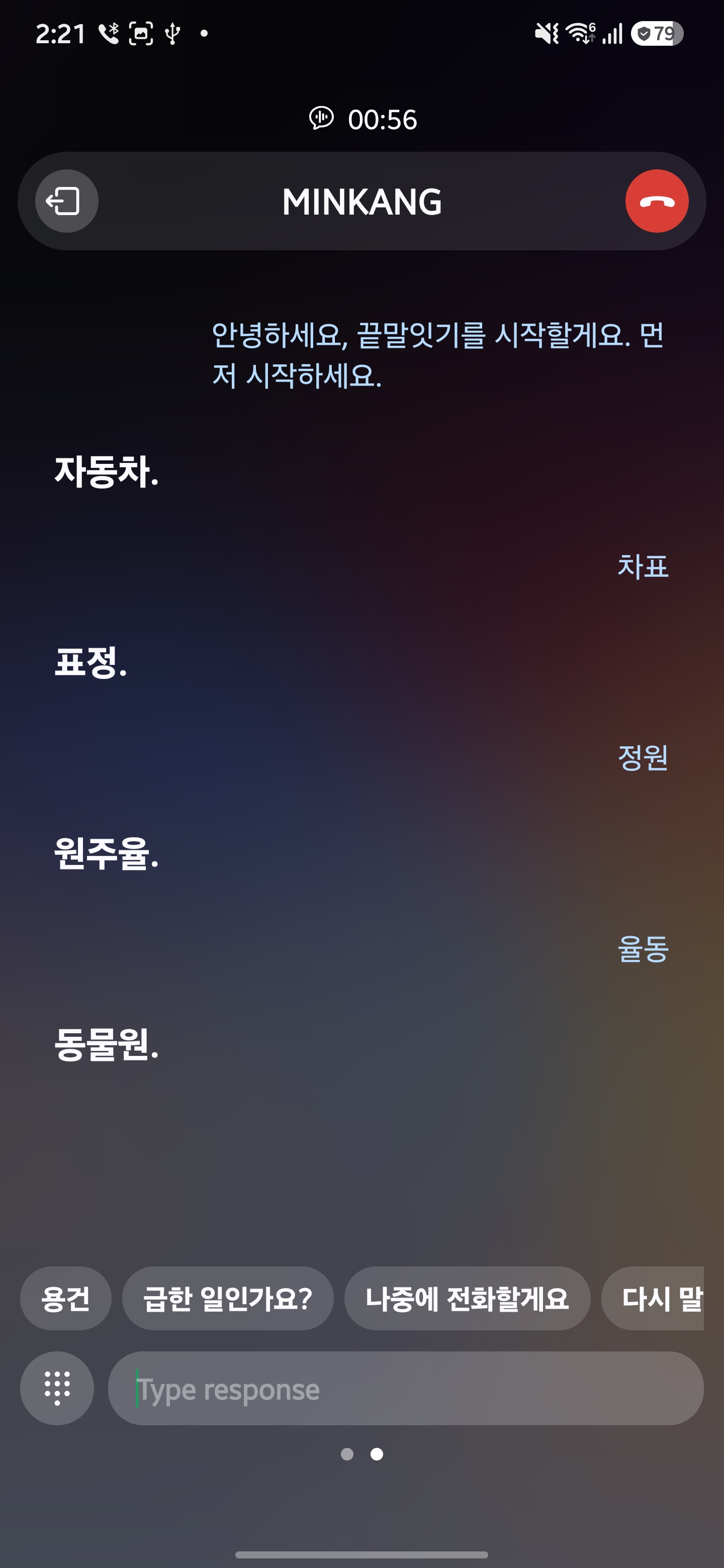
(Note: The conversation in the screenshot is in Korean.)
I ran the tests on a Galaxy S24+ and a Galaxy S26U running One UI 9.
Of course, this isn’t something that could ship as a real-world product. It doesn’t align with Android policies, and because it relies directly on Samsung Galaxy’s built-in call features, future updates could easily break it.
I also used Gemma 4 as the local LLM, and even with GPU acceleration on the Galaxy S26U, the response speed wasn’t fast enough for comfortable everyday use. With multiple stages in the pipeline prone to latency, keeping the conversation snappy was tough.
At the same time, this suggests that a few improvements could make on-device AI calls much smoother:
- Samsung’s Text Call speech recognition (transcription) becomes faster and more accurate.
- Local LLMs become lighter and respond more quickly.
- Mobile GPUs get faster, speeding up on-device LLM inference.
That said, OS-level restrictions on phone call control still remain—so even if all of those improve, this approach may still not be viable for practical use.
Even so, this experiment gave me valuable insights and became a stepping stone for my next project, so I’m more than happy with how it turned out.
Being able to use AI to build things I never could have attempted on my own in the past is genuinely exciting.
I’ve open-sourced AI Call Agent for Galaxy on GitHub, so if you’re curious, feel free to clone it and try it out yourself.